A disconnected handover
A familiar example
- Work recorded on paper
- Photos sent in a message
- Office updates a spreadsheet
- Approval chased by email
- Details entered again for billing
Business operations. Connected around you.
Your business.
Connected.
WorkUplink is a business operations platform tailored to how you work—connecting people, customers, jobs, approvals and administration, with accounting integrations scoped to suit.
Explore WorkUplink From one local team to a national operation.

WorkUplink
| Branch | Latest activity | Status |
|---|---|---|
| North branch | Site inspection | Awaiting review |
| Central branch | Service visit | Approved |
| South branch | Maintenance | Invoice ready |
Built around the way you work.
Your business runs differently. Your software should too. We learn how work moves through your team, then configure your WorkUplink around the forms, responsibilities and handovers that make it yours.

Connect the work behind your business
When job details live in messages, spreadsheets and people’s heads, every handover takes effort. Give your team one clear path from planned work to an invoice-ready record.
Explore WorkUplink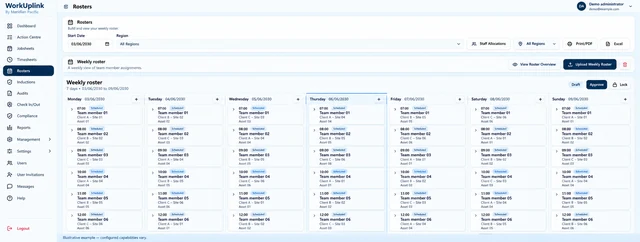
Bring staff, sites and schedules together so managers can see who is doing what, and where.
Explore planning →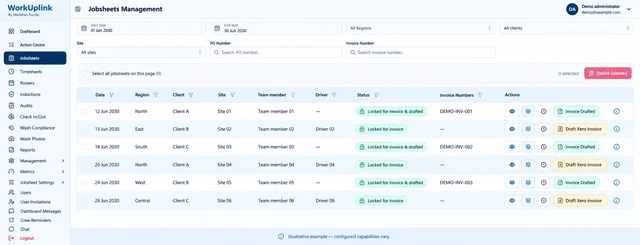
Connect field records, manager approvals and administration. Reduce repeated entry at each step.
Explore approvals →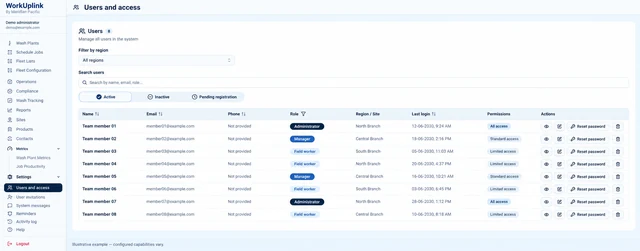
Shape what field staff, branch managers, head office and customers can see and do around their responsibilities.
Explore team access →Select the capabilities your team needs. We shape the workflows, forms and access around your operation.
A clearer way for work to move
Give information a path through the business, instead of asking the next person to find it, chase it or type it again.
A familiar example
An agreed, connected workflow
Your records and their status stay together from field work through to accounting.
Job logs, photos, hours and sales activity feed into your portal from the people doing the work.

 Job logged · Ready for review
Check records, request corrections and approve work—with access defined by role, branch and location.
Review queue
| Job | Location | Status |
|---|---|---|
| Site inspection | North branch | Awaiting review |
| Service visit | Central branch | Approved |
| Maintenance | South branch | Ready for invoicing |
Bring approved work together for administration and invoice preparation, without re-entering the same details at every step.

Accounting integration, including Xero where agreed, can simplify invoice preparation and reduce manual handling.
Integration scope is agreed for your business.
Invoice workflow
 Approved workPrepare invoices
 Send to accountingComplete
Stop paying for the same information to be handled again and again. A connected workflow helps reduce admin effort, catch missing details earlier and move completed work towards billing.
WorkUplink in practice

Keep local branches moving while head office sees the wider picture. Connect field crews, regional managers and central invoicing through one agreed process—with access matched to each role.

For trades, maintenance and small service teams: log work and photos on site, keep your partner or office up to date, and prepare invoices from completed jobs. Xero integration is scoped to suit your business.

For growing service, facilities and equipment businesses: connect sales handovers, scheduling, job delivery and approvals before another spreadsheet becomes another bottleneck.
A platform and service, shaped around your operation
You do not need to arrive with a software specification. We begin where work slows down, agree one useful workflow and connect more as you grow.
Learn what your people do, which tools they use and where work gets held up.
Agree the records, roles, handovers and approvals that need to connect.
Shape your WorkUplink around the agreed records, workflows, permissions and integrations.
Test with your team, check access and prepare the agreed rollout.
Review new needs as your operation changes, with additions agreed before work begins.
No. Start with the workflow that will make the most difference. Your first version, integrations and later additions are agreed with you.
We assess your existing tools first. Accounting integrations, including Xero, are scoped around the records and approvals your business needs. Not every tool or sync is automatically supported.
Yes—roles and access requirements are part of the design. We agree what staff, managers, administration and customers should see and do, then configure and test those permissions during implementation.
WorkUplink combines customer-specific implementation with an ongoing platform subscription. Pricing depends on the workflows, users, integrations and support required, so we scope it after understanding your operation.
Tell us about your team, locations and the handover that takes too much effort. We’ll help identify a practical starting point.
Prefer email? sales@meridianpacificholdings.com